Overview
Wizard
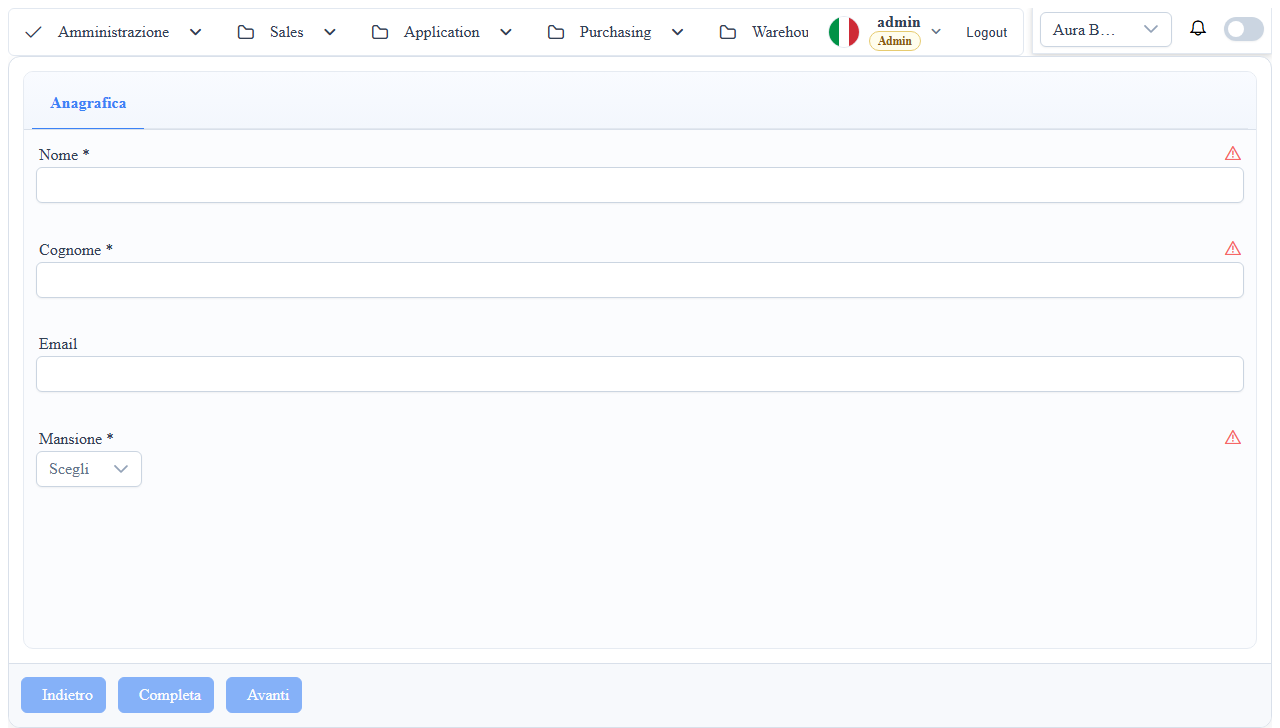
Step mode of the form archetype for guiding multi-section data entry. A wizard is not a dedicated component: it is <wuic-parametric-dialog> with isWizard=true on a table with md_tab_edit=true, where every tab becomes a step.
When to Use It
- Guided processes
- Complex insertions
- Onboarding or operational setup
Defining it via metadata
1. _metadati__tabelle.mdtabedit = 1 (md_tab_edit=true): enables tabs in the form; every tab becomes a step.
2. For each step set mc_edit_associated_tab = '<step_name>' on the columns that belong to it. Columns without a tab end up in the non_associati_a_tab step.
3. Order the steps with md_props_bag.archetypes.form.orderedTabs (case-insensitive match).
4. Mark the mandatory fields of a step with mc_validation_required=true: validation runs on every "Next".
Operational Notes
- Based on
parametric-dialogwith theisWizardflag - Reuses standard form table/column metadata
md_props_bag: archetypes.form (Reused by the Wizard)
The wizard does not introduce a dedicated archetypes.wizard node: it uses the same archetypes.form options.
{
  "archetypes": {
    "form": {
      "columns": 1,
      "orderedTabs": ["step_1", "step_2", "step_3"]
    }
  }
columns: field layout density within the steps.orderedTabs: step/tab display order in the wizard.
Navigation: the three canonical custom actions
Next, Previous and Complete are custom actions of the table (_mtdt__cstom__actions__tabelle), created automatically by the designer when you configure a wizard. Callbacks and disable rules are JS strings evaluated at runtime with scope (field, targetField, record, fieldNewValue, fieldOldValue, evaluationResult, datasource, wtoolbox).
| Caption | CSS | action_callback | disable_callback |
|---|---|---|---|
wizard.prev.action | wizard-prev-btn | datasource.selectPreviousVisibleTab(); | return !datasource.hasPreviousVisibleTab |
wizard.next.action | wizard-next-btn | datasource.selectNextVisibleTab(); | return !datasource.hasNextVisibleTab |
wizard.complete.action | wizard-complete-btn | await datasource.syncData(datasource.resultInfo.current, datasource.pristine); datasource.setCurrent(null); datasource.setSelectedTab(0, true, true); | return !datasource.canCompleteWizard() |
The framework disables the three buttons by itself according to the navigation state (first step, last visible step for Complete). You can override the callbacks, for example for custom validations before moving on, as long as you keep the contract.
Validation on Next
selectNextVisibleTab calls setSelectedTab(<step>, allowHidden=false, skipValidation=false): the current tab is validated synchronously; on failure a warning toast appears and navigation stops. The rules are those of the standard form (mc_validation_required, validation rules: see Validations).
Conditional steps
A step is hidden or shown with a Condition Action Item of type 5 (toggleTabByIndex) bound to the value change of a key column. Hidden steps are skipped by Next/Previous and do not count for Complete. After Next the framework focuses the first enabled field of the new step.
Completion
wizard.complete.action saves with syncData (insert or update depending on whether the record exists), clears the current record and returns to the first step. After the first save the record becomes "existing": later saves emit updateRecord.
Events and Subscriptions (Host)
The wizard uses wuic-parametric-dialog with isWizard=true, so it exposes:
onDialogDataBoundonDialogTabChangeonWizardStepChangeonDialogCustomActiononDialogSubmitonDialogRollbackonDialogCloseRequested
Template example:
<wuic-parametric-dialog
  [hardcodedDatasource]="citiesDs"
  [isWizard]="true"
  (onWizardStepChange)="onWizardStepChange($event)"
  (onDialogSubmit)="onWizardSubmit($event)">
</wuic-parametric-dialog>
Screenshot