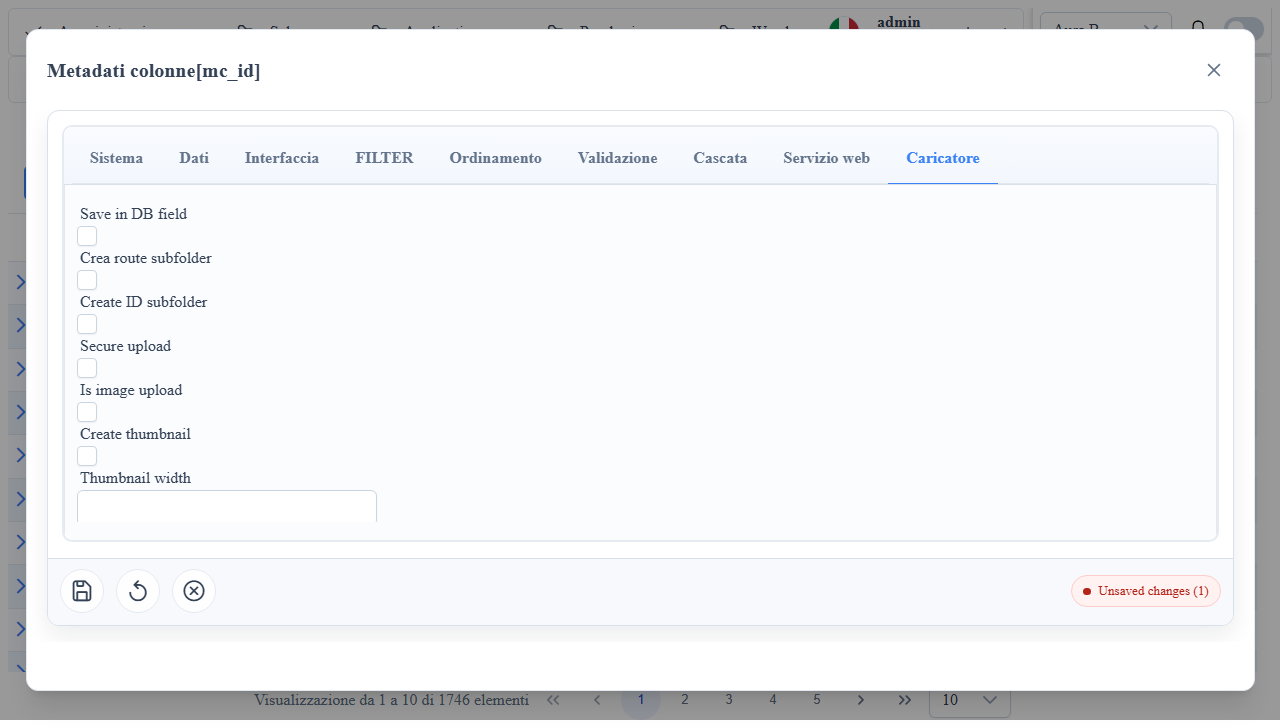
Overview
Widget Upload
Column widget for file uploading with a dedicated Uploader/Upload tab in the column metadata-editor.
When to Use It
- Document/image attachments on records.
- Single or multiple upload with file metadata.
- Scenarios with thumbnails and type/size validations.
Column Metadata Properties (Upload tab)
isImageUpload: enables image handling + preview.isDBUpload: file persistence in the DB.isMultipleUpload: multiple upload.IsZippedUpload: zip archive support.UseRouteNameAsSubfolder: subfolder from route.UseRecordIDAsSubfolder: subfolder from record id.DefaultUploadRootPath: upload root path.allowed_file_types: extension/MIME whitelist.max_file_size: maximum file size.createThumb,thumbWidth,thumbHeight: thumbnail management.customUploadHandlerPath: custom upload endpoint.
Useful mc_props_bag
Snippet 1JSON
{
  "uploader": {
    "beforeUpload": "function(event, field, record){ return true; }"
  },
  "style": {
    "editCss": "min-height: 52px;"
  },
uploader.beforeUpload: client-side hook before upload submission.style.editCss: uploader area style.form.columns: form layout.
Client/Server Effects
- Client: file picker, preview, immediate validations.
- Server: storage on DB or filesystem according to metadata.
Operational Notes
- Always use
allowed_file_types+max_file_sizetogether for hardening. - With multiple upload, verify
MultipleUpload*metadata field mappings. - Since 1.7.13 upload and download require login; download returns only files from the record's folder: of the
filenameparameter only the file name counts. - Subfolders (
UseRouteNameAsSubfolder,UseRecordIDAsSubfolder) andDefaultUploadRootPathare decided by the column metadata read on the server; the values sent by the client count only when the column cannot be resolved (custom handler). The root isuploadFolderif absolute, otherwise<projectDataFolder>/Upload, the same on every provider.
Screenshot