CrmApp is the first of the three free distributions we ship on top of WUIC. It runs on your own Windows server, talks to your own SQL Server, and uses the WUIC framework runtime under a bundled host-binding license — which means you don't need to buy anything to run it. The download is a single CrmApp-iis-v1.7.0-with-dbs.zip archive on the Downloads page: unzip, point IIS at the folder, restore the two shipped databases, you're live.
This post covers three things:
- What's actually inside (features list, real ones — not the marketing version)
- Who it's for (use cases where it pays off, and use cases where it doesn't)
- The licensing rule, which is simple but worth stating once clearly
What's inside
CrmApp is a B2B CRM. Not a marketing automation suite, not a help-desk-only ticket system — a sales pipeline tool. The shipped database has the entities you'd expect:
- Accounts & contacts — companies and the people inside them, linked, with the usual anagrafica fields and soft-delete
- Leads — with conditional grid styling so the hot ones stand out
- Opportunities — value, stage, owner, plus product lines per opportunity with automatically recalculated totals
- Activities — calls, meetings, emails attached to an account or opportunity, with assigned-to and due-date
- Helpdesk cases with SLA tracking — a lightweight case module with SLA deadlines, so post-sale doesn't live in a separate tool
- Pipeline view — kanban board grouping opportunities by stage, drag-and-drop to move them
- Guided "new opportunity" wizard — a four-step workflow (account → contact → opportunity → products) built on the framework's workflow engine, launched from its own menu entry
- Dashboards & notifications — per-role widgets and an in-app notification table
- User & role management — an
admin_testuser is seeded out of the box; add your own users and roles from the UI
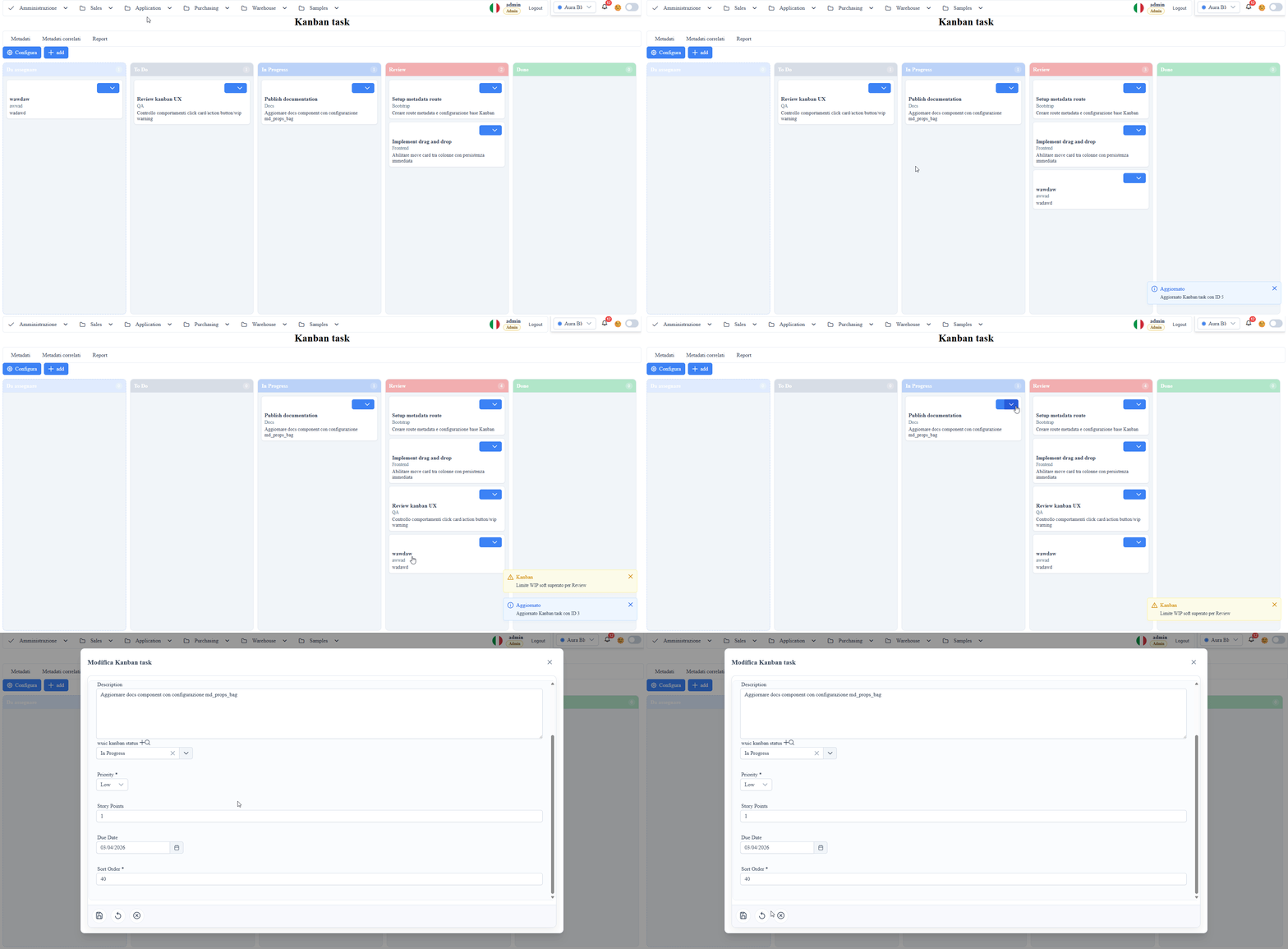
The UI is metadata-driven (the part of WUIC that scaffolds CRUD forms from _metadati__tabelle / _metadati__colonne rows — same engine described in our earlier post). Practical consequence: every list page has search, sort, column visibility, filter chips, export to Excel, edit dialog. You don't lose any of that when you add a new field.
What's NOT inside (on purpose):
- No outbound email automation (drips, sequences). If you want SendGrid integration you wire it in via the
customCrudHookClasshook inappsettings.json - No native phone integration. No Twilio/dialer plugin ships in the free distribution
- No mobile app. The UI is responsive — the framework's
DeviceAwarenessServiceswaps list grids to a card stack below the 768 px breakpoint (configurable) — but there's no Android/iOS native shell
Who it's for
CrmApp pays off when you check at least two of these boxes:
- You're a small B2B team (5–50 sales people) and the €15/user/month CRM SaaS bill bothers you more than the once-off setup time
- Your data must stay on-prem — regulated industry, PII concerns, customer contract that forbids US-based cloud processors
- You have an in-house dev who can run a PowerShell script — not "knows .NET inside out", just "can read INSTALL.md and run
iisreset" - You want to extend the CRM — add an Italian-specific table (e.g.
commesse,intermediari), add a custom button on the customer list that hits an internal API. This is much easier when the source isC:\inetpub\wwwroot\CrmAppthan when it's a closed SaaS
It does NOT pay off if you're a 200-person sales org that needs Salesforce-tier integrations (DocuSign, Marketo, native LinkedIn enrichment) or if your IT policy mandates that all line-of-business apps live in a SOC 2-audited cloud you don't operate. Use the right tool.
How to install (10 minutes, honestly)
- Download
CrmApp-iis-v1.7.0-with-dbs.zipfrom the Downloads page - Unzip into
C:\inetpub\wwwroot\CrmApp - Restore the two
.bakfiles shipped in thedb\folder (data.bak+metadata.bak) to your SQL Server — the bundledINSTALL.mdhas the exactRESTORE DATABASEstatements. SQL Server 2017 or later; Express edition is enough - Edit
appsettings.jsonand set the two connection strings to your SQL Server instance - In IIS Manager: add new site, point to the unzipped folder, set the app pool to No Managed Code (this is ASP.NET Core 10, the pool isn't loading any CLR)
- Browse to the URL, log in as
admin_test / Test123!
That's it. The bundled host-binding license makes the framework runtime authorize itself automatically — no key to copy, no email to send, and you can install on as many servers as you want.
The licensing rule — one sentence
CrmApp is free as-shipped. If you rebuild the app from source you need a WUIC license (Developer or Professional tier, see Pricing).
The reason is mechanical, not commercial: the free distribution is authorized by an embedded host-binding-license.lic resource signed against the specific assembly identity of CrmApp.dll (strong-name PKT 803e91d55e6d2981). The moment you recompile CrmApp.dll from the source ZIP — even just to bump the version, change a controller, or add a [Authorize] attribute — the resulting binary loses the embedded WUIC.HostBindingLicense resource (we don't ship the .snk strong-name key or the RSA private key that signs the .lic), so it can't carry the original PKT or the original signature. The runtime falls back to the standard machine-fingerprint license check.
You can still extend CrmApp without recompiling the app binary: add new metadata via SQL (rows in _metadati__tabelle / _metadati__colonne), add Angular components in the wwwroot frontend tree, add scheduled jobs (rows in the scheduler table), configure custom action hooks via appsettings.json:customCrudHookClass. All of that ships as-is in the free distribution and is applied at runtime by the binary you already have. The line is: you dotnet publish the source ZIP → you need a license. You change metadata / Angular / SQL only → you don't.
Get it
- Download: Downloads → Free apps → CrmApp — current release is v1.7.0
- Try WUIC first: the framework that powers CrmApp has a live sandbox at demo.wuic-framework.com if you want to feel the metadata-driven UI before installing anything
- Want to recompile? See Pricing — the Developer tier unlocks the framework source and the right to ship recompiled CrmApp binaries inside your products